Printer Friendly
The Free Dictionary
902,874,709 visitors served.
?
Dictionary/
thesaurus
Medical
dictionary
Legal
dictionary
Financial
dictionary
Acronyms
 
Idioms
Encyclopedia
Wikipedia
encyclopedia
?
up

Help: Tools

4. Tools
4.1. Free Tools for Surfers
4.1.1. TheFreeDictionary.com Anywere
4.1.1.1. Desktop Assistant for Windows  
4.1.1.2. Right-Click Browser Add-On
4.1.1.2.1. Add-On For Internet Explorer  
4.1.1.2.2. Extension For Mozilla Firefox  
4.1.1.3. Add to Google Toolbar  
4.1.1.4. Auto-Bookmark Search Engines in Firefox  
4.1.2. Free Daily Content
4.1.2.1. Daily Content on Desktop  
4.1.2.2. Daily Content by Email  
4.1.2.3. Daily content for Yahoo! Users  
4.1.2.4. Customizable Homepage  
4.1.2.5. Feedback  
4.2. Free Tools for Webmasters
4.2.1. Dictionary Look-Up Box
4.2.2. Daily Website Content
4.2.3. RSS Feed  
4.2.4. Promote Your Own RSS/Atom Feed
4.2.5. JavaScript Double-Click Function
4.2.6. Dictionary Link
4.2.7. Partnership
4 Tools  
4.1. Free Tools for Surfers  
4.1.1. Access TheFreeDictionary from Anywhere TheFreeDictionary offers several options for convenient, free access to its contents and search features.
4.1.1.1. Desktop Assistant for Windows This software allows you to instantly access TheFreeDictionary's definitions and encyclopedia entries by selecting any word or phrase on your screen with one click. Learn how to download and install the desktop assistant here.
4.1.1.2. Right-Click Browser Add-On Browser add-ons — also known as extensions — are mini-programs that enhance the default functionality of your web browser.
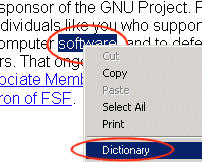
4.1.1.2.1. Add-On For Internet Explorer For Internet Explorer users, TheFreeDictionary offers a browser extension that allows you to access the definition of any word on the web from right inside your browser with a "Dictionary" option that is added to your right-click menu.TheFreeDictionary.com for Internet Explorer
Directions:
  • Open the browser and navigate to any web page.
  • Select (or double-click) any word.
  • Right-click and select "Dictionary" in the menu.

The definition will be presented in a new browser window.

Install the Dictionary Add-on for IE

4.1.1.2.2. Extension For Mozilla Firefox For Mozilla Firefox users, TheFreeDictionary offers a dictionary search extension that enables you to quickly find definitions of words on any webpage or in any email.
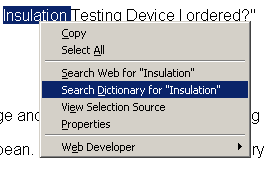
TheFreeDictionary for Mozilla Firefox

Select the word you want to look up, then right click and select "Search Dictionary for ..." A new tab or browser window will open with the meaning of the word you selected.

The right-click Firefox extension is available at dictionarysearch.mozdev.org or addons.mozilla.org/extensions/moreinfo.php?id=68.

4.1.1.3. Add to Google Toolbar If you have the Google Toolbar installed, you can look up word definitions and search encyclopedia articles inside your browser's toolbar. Click here to add TheFreeDictionary to your browser's Google toolbar.
4.1.1.4. Auto-Bookmark Search Engines in Firefox Firefox users can auto-bookmark search engines in the Firefox search box. Users can auto-bookmark the Dictionary search engine, the Encyclopedia search engine, or both.

The following window will appear (click "OK"):

To use TheFreeDictionary Search:

4.1.2. Free Daily Content Our free "Infotainment" content is updated daily, and you can read it without visiting TheFreeDictionary.com.
4.1.2.1. Daily Content on The Desktop You can read Word of the Day, This day in History, Today’s Birthday, Quotation of the Day, and Article of the Day right from your desktop using the Windows Active Desktop. This feature does not require you to install any software in your computer.
4.1.2.2. Daily Content by Email You can sign up to receive free daily content (Word of the Day, This Day in History, Today’s Birthday, Quotation of the Day, and Article of the Day) in your inbox each morning.

We at TheFreeDictionary are concerned about email spam. We therefore do our very best to ensure that you never receive unwanted emails from our site. You will receive a confirmation email to make sure that you are truly interested in receiving Daily Infotainment, and you can also opt out of the email by clicking the "SafeUnsubscribe" button that appears on the bottom of every email:

Please note: We will never sell, share, or distribute your email address to anyone.

4.1.2.3. Daily content for Yahoo! users To add our daily content to your My.Yahoo!.com page, click on the button and you will be taken to the Free Content page on our site. From there, click on one of the following links:

Yahoo! will request a confirmation, so you will need to click on the button. You will see a message confirming the addition to your Yahoo! page. When you visit your page, scroll down to the bottom, and you will see the added information.

4.1.2.4. Customizable Homepage See Homepage help.
4.1.2.5. Feedback See Feedback help.
4.2. Free Tools for Webmasters Free website content and other tools for your site available from TheFreeDictionary
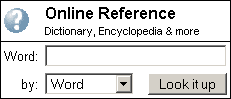
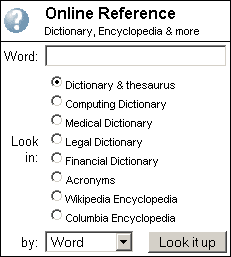
4.2.1. Dictionary look-Up Box Let your users easily access all of TheFreeDictionary’s content from your website by adding the Dictionary Lookup feature to your site. Choose either the complete layout or the simple layout. You can choose to have the Dictionary open in the same window or in a new window. You can also select font and text sizes, as well as background and text colors.

Simple

This is a great way to offer the best of both worlds to your users: your site and TheFreeDictionary.com!


Complete

4.2.2. Daily Website Content Click on Free content for your website and add any of the free content from TheFreeDictionary to your site. This content includes This Day in History, Word of the Day, Today’s Birthday, Quotation of the Day, Article of the Day, and In the News. We have a basic layout that is convenient for most users, as well a customizable layout for advanced users.
4.2.3. RSS Feed RSS feeds are available at:
4.2.4. Promote your own RSS/Atom feed If you have a blog, add this button to let people access it as an RSS feed from TheFreeDictionary.com. Find instructions here.
4.2.5. JavaScript Double-Click Function You can allow visitors to find the definition of any word on your website with a double-click. Click on Linking to the Dictionary and follow the instructions to add double-click functionality to your site.
4.2.6. Dictionary Link You can add a link from your page to TheFreeDictionary.com. Click on Linking to the Dictionary and follow the instructions to add TheFreeDictionary to your site!
4.2.7. Partnership TheFreeDictionary is always on the lookout for great partnerships. Customized partnerships are available for websites with at least one million monthly visitors. Direct advertising is also available on TheFreeDictionary.com and TheFreeLibrary.com. Click on Partner with us to learn more.
Disclaimer | Privacy policy | Feedback | Copyright © 2008 Farlex, Inc.
All content on this website, including dictionary, thesaurus, literature, geography, and other reference data is for informational purposes only. This information should not be considered complete, up to date, and is not intended to be used in place of a visit, consultation, or advice of a legal, medical, or any other professional. Terms of Use.